



Traditional Business Intelligence environments are often based on multiple separate solutions responsible for data integration, storage, processing, and visualization. This approach increases infrastructure complexity, makes management more difficult, and leads to higher maintenance costs. As a result, more and more organizations are choosing to consolidate their analytics environments and build modern data platforms. At the same time, the role of artificial intelligence in business processes continues to grow.
The answer to these challenges is Microsoft Fabric, a modern analytics platform delivered as Software as a Service (SaaS) that integrates every stage of working with data into a single environment. Microsoft describes Fabric as a Unified Data Platform for AI because it combines data integration, processing, analytics, reporting, and AI capabilities without requiring multiple independent services.
In this guide, we will explain what Microsoft Fabric is, which business challenges it solves, and how it helps organizations build scalable, secure, and modern data platforms.
What Is Microsoft Fabric?
Microsoft Fabric is a comprehensive analytics platform developed by Microsoft that enables organizations to manage the entire data lifecycle, from data ingestion and integration through processing and storage to analytics, reporting, and artificial intelligence.
The platform is designed to eliminate the need for organizations to manage infrastructure or integrate multiple separate services on their own. All core components operate within a single environment, leveraging a shared layer for data storage, governance, and security.
Microsoft Fabric integrates capabilities related to:
- Data integration
- Data engineering
- Databases
- Real-time analytics
- Power BI reporting
- Artificial intelligence and analytics process automation
This approach reduces the number of tools required and simplifies the development of a modern data architecture across the organization.
What Problems Does Microsoft Fabric Solve?
In many organizations, data is scattered across multiple systems and applications. Individual departments often use separate tools, and creating consistent analyses requires time-consuming integration of information from various sources. Such an architecture makes decision-making more difficult and increases the risk of data inconsistencies.
Microsoft Fabric was created to address the most common challenges associated with data management.
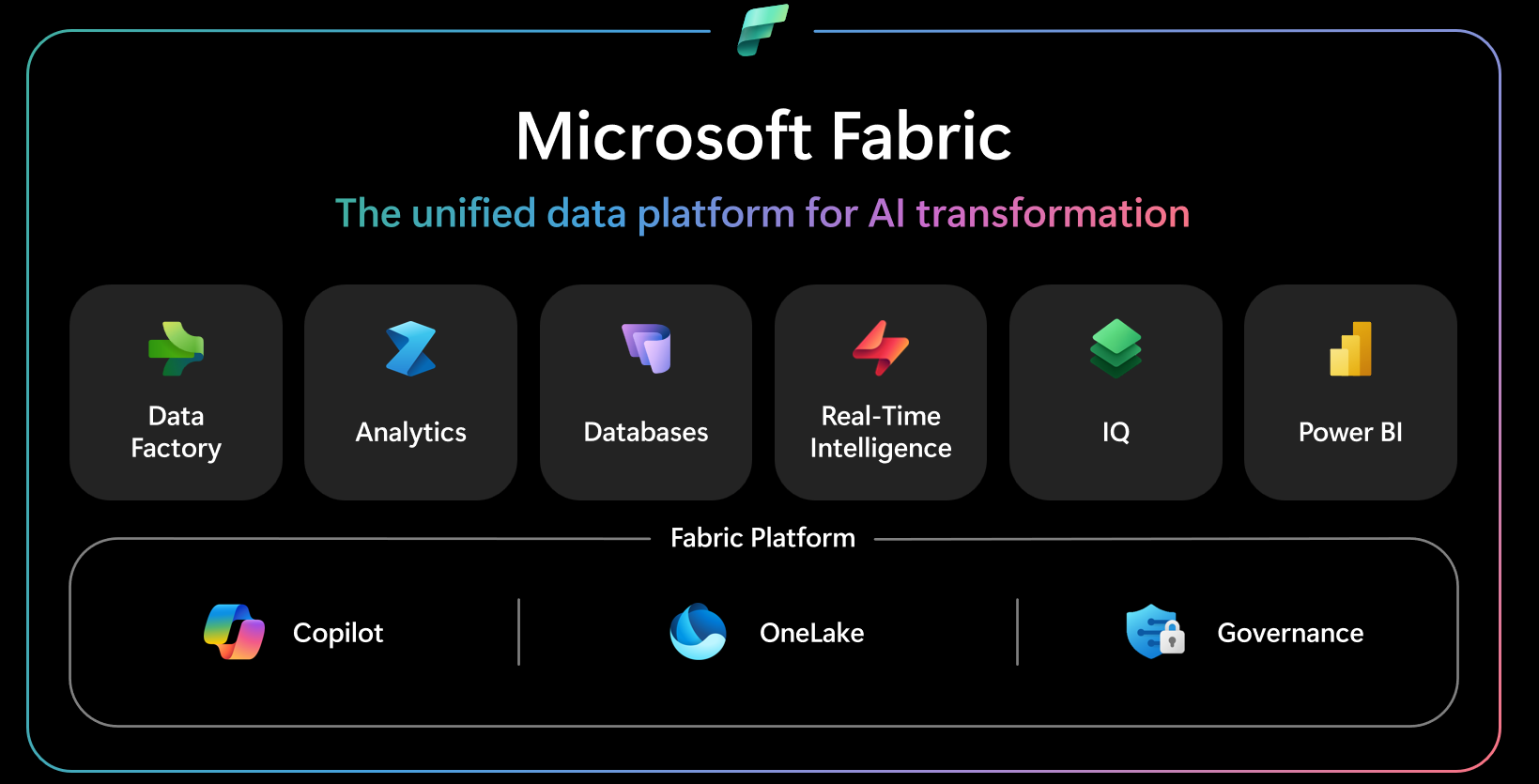
Microsoft Fabric Architecture
One of the most significant changes introduced by Microsoft Fabric is the shift away from multiple independent services toward a single integrated data platform. Instead of building an analytics environment using several disconnected tools, organizations gain a complete solution that covers the entire data lifecycle, from ingestion and processing to analytics, reporting, and AI.
Microsoft refers to Fabric as a Unified Data Platform for AI because all functionalities operate within a single environment, sharing the same data, security, and governance foundation.
The diagram below illustrates the key components of the Microsoft Fabric architecture.
Data Factory
Data Factory is responsible for integrating data from multiple sources and automating ETL and ELT processes. Through its extensive connector library, organizations can ingest data from both on-premises systems and cloud services, preparing it for further analysis.
Analytics
The Analytics layer provides tools for processing and analyzing large-scale datasets. It includes environments such as Lakehouse, Apache Spark, and notebooks, enabling analytics teams and data engineers to develop advanced analytical models.
Databases
One of the newest additions to the platform is Databases, which allows organizations to create modern SQL databases directly within Microsoft Fabric. The platform also supports Mirroring, which synchronizes data from systems such as Azure SQL Database, Azure Cosmos DB, Snowflake, and Azure Databricks without requiring manual migration.
Real-Time Intelligence
More organizations than ever need to analyze data immediately after it is generated. Real-Time Intelligence enables processing of data from IoT devices, business applications, system logs, and operational events. This allows businesses to respond more quickly and make decisions in real time.
Fabric IQ
Fabric IQ is a new platform component, currently available in Preview, designed to unify business semantics across the organization. The solution uses semantic models, knowledge graphs, and AI agents to ensure consistent definitions of metrics, processes, and data across different teams.
Power BI
Power BI remains an integral part of Microsoft Fabric, providing interactive reports, dashboards, and business analytics capabilities. Because Power BI works directly with data stored in Fabric, users always have access to up-to-date information without creating additional copies of data.
The greatest advantage of the Microsoft Fabric architecture is that all components operate on the same data layer. This eliminates the need to copy data between services, simplifying analytics environment management, improving performance, and ensuring data consistency across the organization.
The Foundation of Microsoft Fabric
One of the key differentiators of Microsoft Fabric compared to traditional Business Intelligence platforms is its shared foundation for data storage, artificial intelligence, and security management. Whether users work with Data Factory, Power BI, Real-Time Intelligence, or databases, all services leverage the same platform capabilities.
OneLake: A Single Data Repository for the Entire Organization
At the heart of Microsoft Fabric is OneLake, a centralized data repository built on Azure Data Lake Storage Gen2. Unlike traditional architectures where data is stored across multiple independent repositories, OneLake provides a single logical location for storing and managing organizational data.
Key benefits of OneLake include:
- A single data repository for all teams and projects
- Elimination of data silos
- Simplified access management
- Greater consistency across departments
No Data Copying
One of the core principles of Microsoft Fabric is minimizing data duplication across services. All platform components work on the same datasets stored in OneLake, reducing ETL workloads and lowering data storage costs.
Zero-Copy Architecture
Microsoft Fabric uses a Zero-Copy architecture that allows multiple services to work with the same data simultaneously. Data does not need to be duplicated for reporting, analytics, or machine learning purposes. This improves performance while reducing the risk of inconsistent data versions.
Shortcuts
OneLake Shortcuts allow organizations to access data stored in other platforms such as Azure Data Lake Storage, Amazon S3, and Google Cloud Storage without physically moving it. This enables cross-cloud analytics within a unified analytical environment.
Copilot: Artificial Intelligence in Microsoft Fabric
AI-powered solutions are becoming the standard in modern analytics. Copilot in Microsoft Fabric was designed as an intelligent assistant supporting users at every stage of working with data.
It can assist with:
- Generating SQL, Spark, and Power Query code
- Creating database queries
- Building and configuring Data Factory pipelines
- Analyzing data and identifying trends
- Automatically generating summaries, descriptions, and insights from reports
By leveraging AI, teams can deliver analytical solutions faster and reduce repetitive manual work.
Governance: Security and Data Management
As the volume of data grows, effective governance becomes increasingly important. Microsoft Fabric offers extensive Data Governance capabilities that help organizations maintain control over business-critical information.
A key role is played by Microsoft Purview, which is integrated into the platform and provides centralized data governance.
Microsoft Purview
Provides centralized data management, information cataloging, and compliance control aligned with organizational policies.
Access Management
Administrators can define roles and access levels for data and platform resources, enhancing information security.
Lineage
The Data Lineage capability enables complete tracking of data flows from source systems to Power BI reports. This simplifies impact analysis and troubleshooting.
Compliance
The platform helps organizations meet security, privacy, regulatory, and internal compliance requirements.
Sensitivity Labels
Microsoft Fabric supports data classification through Sensitivity Labels, helping organizations identify confidential information and automatically apply protection policies when data is shared or processed.
Through the combination of OneLake, Copilot, and Governance, Microsoft Fabric delivers a unified environment that simplifies data management while supporting secure, scalable, and AI-ready Business Intelligence platforms.
Key Components of Microsoft Fabric
One of the greatest advantages of Microsoft Fabric is that it brings together all essential data capabilities within a single platform. Each component supports a different phase of the analytics lifecycle, from data integration and processing to reporting and artificial intelligence.
Data Factory: Data Integration and Process Automation
Data Factory is responsible for data ingestion, integration, and transformation from multiple sources. It enables organizations to create automated data processing workflows that form the foundation of modern Business Intelligence solutions.
Key features include:
- Integration of data from on-premises and cloud systems
- Access to more than 200 native connectors
- Support for ETL (Extract, Transform, Load) and ELT (Extract, Load, Transform) processes
- Use of Power Query for intuitive data preparation and transformation
This enables organizations to automate data flows and significantly reduce the time required to prepare data for analytics.
Analytics: Comprehensive Data Analysis
The Analytics layer brings together tools used by analysts, data engineers, and data scientists to process large data volumes and build advanced analytical models.
Data Engineering
A dedicated environment for designing large-scale data processing workflows and preparing datasets for further analysis.
Data Science
Supports machine learning model development and predictive analytics. Users can build experiments, train AI models, and deploy them without leaving Microsoft Fabric.
Lakehouse
Lakehouse combines the benefits of a traditional Data Lake and a data warehouse. It supports both structured and unstructured data while maintaining high SQL query performance.
Apache Spark
Microsoft Fabric uses Apache Spark for large-scale data processing, enabling parallel execution of analytical workloads and advanced Data Engineering and Data Science use cases.
Notebooks
Notebooks allow users to write code in languages such as Python, SQL, and Scala, document analytical processes, and collaborate with team members in a shared environment.
Databases: Modern Databases in Microsoft Fabric
Databases is one of the newest platform components, enabling organizations to create and manage databases directly within Microsoft Fabric.
Key capabilities include:
- SQL Database support
- Mirroring for synchronizing data from existing systems without duplication
- Azure SQL Database integration
- Azure Cosmos DB support
- Compatibility with Snowflake
- Azure Databricks integration
With Mirroring, organizations can work with existing data sources in near real time while maintaining consistency and reducing integration complexity.
Real-Time Intelligence: Real-Time Data Analytics
Real-Time Intelligence enables organizations to process information as events occur and react immediately to business conditions.
Typical use cases include:
- IoT analytics
- Production process monitoring
- Application log analysis
- Business and operational event monitoring
- Real-time dashboarding
This enables faster anomaly detection, KPI monitoring, and data-driven decision-making.
Fabric IQ (Preview): Unified Data Semantics and AI
Fabric IQ is one of the newest Microsoft Fabric features and is currently available in Preview.
Capabilities include:
- Business semantics for consistent data definitions
- Fabric Graph for building relationships between data, processes, and users
- AI Agents for analytics automation
- Ontology for organizing organizational knowledge
- Reusable KPI definitions across reports and analytical projects
Although still evolving, Fabric IQ demonstrates Microsoft’s direction toward AI-driven analytics supported by shared business semantics.
Power BI: Reporting and Business Analytics
Power BI remains an integral part of Microsoft Fabric and serves as the primary interface for delivering insights to business users.
It enables:
- Creation of interactive reports
- Development of modern dashboards
- Self-Service BI capabilities
- Secure sharing of insights through Microsoft 365 services such as Microsoft Teams and Excel
Thanks to deep integration with Fabric, reports leverage the same data stored in OneLake, eliminating issues caused by multiple versions of the same information.
Microsoft Fabric and AI
Artificial intelligence has become one of the most important elements of modern analytics platforms. Organizations increasingly expect solutions that not only provide access to data but also help analyze it faster, automate repetitive activities, and support better business decisions.
That is why Microsoft Fabric was designed as a Unified Data Platform for AI, with artificial intelligence built directly into everyday data workflows.
Copilot: The Intelligent Assistant in Microsoft Fabric
One of the platform’s core capabilities is Copilot, an AI-powered assistant that supports users throughout the data lifecycle.
The most important capabilities of Copilot in Microsoft Fabric include:
- Automatic generation of SQL and Power Query queries
- Creation of Python and Spark code
- Assistance with Data Factory pipeline development
- Explaining code and data transformations
- Generating technical documentation
This allows users to focus on analytics and business value rather than repetitive manual tasks.
Automatic Code Generation
Building ETL processes, data transformations, and SQL queries often requires specialized technical knowledge. Microsoft Fabric uses Copilot to generate code directly from natural language instructions.
Supported scenarios include:
- SQL query creation
- Spark code generation
- Power Query transformation creation
- Notebook development
- Existing code optimization
This reduces development time and minimizes errors associated with manual coding.
Report Creation
Artificial intelligence also supports report development in Power BI. Users can leverage AI-assisted visualizations, chart recommendations, and automated data summaries.
As a result, initial report development is significantly faster, allowing analysts to focus on delivering business insights.
Data Analysis
Modern analytics goes beyond data visualization. Microsoft Fabric uses AI to identify patterns, detect anomalies, and uncover trends that may be missed through traditional analysis.
AI-powered capabilities help:
- Identify deviations from expected behavior
- Analyze metric fluctuations
- Detect relationships within datasets
- Generate summaries and recommendations
This approach enables faster data-driven decision-making and improves analytical efficiency.
Predictions and AI Models
Microsoft Fabric also supports the development and deployment of machine learning models. Through integrated Data Science capabilities, organizations can implement predictive analytics solutions.
Example use cases include:
- Sales forecasting
- Demand prediction
- Risk analysis
- Anomaly detection
- Predictive maintenance in manufacturing
These models can then be used directly within Power BI reports and across the broader Microsoft Fabric ecosystem.
Integration with Microsoft Foundry
An important part of the platform’s evolution is its integration with Microsoft Foundry, which expands AI capabilities across the organization.
Organizations can leverage ready-to-use AI models and tools supporting the full lifecycle of model development, deployment, and management. This enables more advanced analytical scenarios and generative AI applications while maintaining a unified data environment.
Summary
If your organization is planning a Microsoft Fabric implementation, migrating from an existing analytics platform, or looking to maximize the value of Power BI, it is worth starting with an assessment of your current data architecture and business requirements.
A well-designed platform will not only improve reporting processes but also establish the foundation for AI solutions that can support business growth for years to come.
Planning a Microsoft Fabric implementation in your organization?
We can help you design a modern data platform tailored to your business needs. At EBIS, we support organizations throughout every stage of the project, from requirements analysis and architecture design through data integration, data warehouse development, Power BI implementation, and user training.